Digital Station Walkthrough with PCI Development
Project type
Real-time 3D Interactive Walkthrough
(Transit-Oriented Development Visualization)
Date
Aug 2026
Role
3D/2D Designer
Website
Tools


Meet Our Team


SHUNE
Ana Gusson
3D Artist
Product Manager


Maggie Yuan
Ernie Wong
Project Manager
Developer
LiYa Ma
Lulu Bai
HEAD Developer
UI/UX Designer
Project Brief
PCI Developments asked us to develop a tool that:
-
Helps PCI to clearly visualize their development site
-
Create stronger alignment internally
Problem Overview
PCI Developments asked us to develop a tool that:
-
2D renderings do not translate the project’s complexity.
-
Their existing solution felt artificial and caused discomfort.
Leading to:
-
A frustrating user experience
-
Crucial information is not clearly communicated

Research Overview

How do we convey a sense of scale?

How do we make it feel like vancouver?

How will users navigate the space?

What is the best fitting tech for this project?
Project Challenges and Solutions
01
Challenges
-
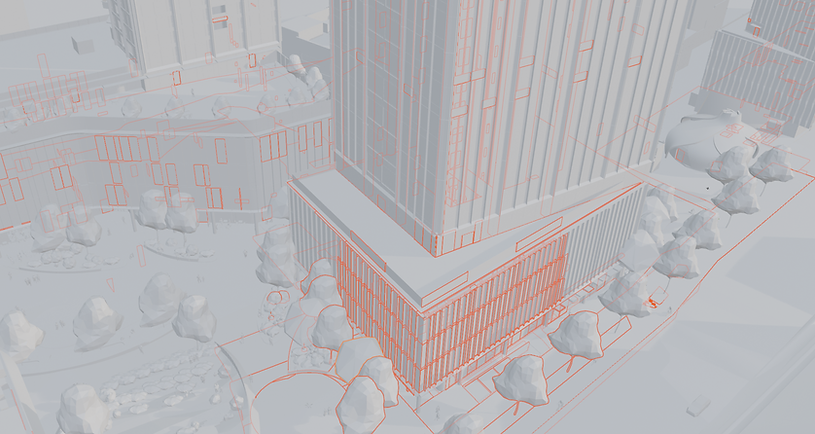
Raw FBX files contained tens of thousands of unorganized objects and heavy geometry.
Solutions
-
With the client’s display scope confirmed, we stripped hidden indoor, underground and distant meshes to lightweight the full scene for real‑time runtime.
Original triangle count: 4,656,734
Optimized triangle count: 240,617


Polygon reduction: 4,416,117 triangles (~94.83% reduction)
02
Challenges
-
Original assets had no hierarchy or grouping for batch management
Solutions
-
We manually clustered scattered models by functional unit and built a clean hierarchy with unified material folders for streamlined asset workflows.


03
Challenges
-
Overlapping geometry produced Z‑fighting flicker and dark rendering patches.
Solutions
-
We removed all intersecting and coplanar faces to resolve Z‑fighting entirely and deliver consistent, flicker‑free rendering.


04
Challenges
-
The source scene only held plain white meshes with no material or texture data
Solutions
-
We authored custom albedo and normal maps to reconstruct surface details and support physically based rendering.

05
Challenges
-
Props including trees, seating and characters came without usable textures
Solutions
-
We swapped untextured prop assets for engine‑ready standard library assets to harmonize visual quality across the environment.


06
Challenges
-
Unseen interior and underground geometry added unnecessary performance overhead.
Solutions
-
We retained only the plaza and sky restaurant exterior, removing non‑visible structural meshes to reduce GPU load.


Challenges
-
The petal landmark building had fragmented high‑poly geometry and messy UVs.
Solutions
-
With on-site reference photos, we retopologized the building, cleaned UVs and baked PBR textures while preserving its original architectural form.

07


Scene model iteration
Reference


Iteration


Scene model iteration
Reference


-
With Vancouver reference photos, we built skyboxes for day/noon/night, and used emissive materials + lights to simulate night lighting after Unity render pipeline optimization.


Texture
Reference


-
Simulation of the Surrounding Environment


-
Created a full set of PBR textures by referencing client renderings and real-world site photos.
